
 −26% DIGITAL LICENCE
Office & Productivity
Rs. 3,400.00 Rs. 2,500.00
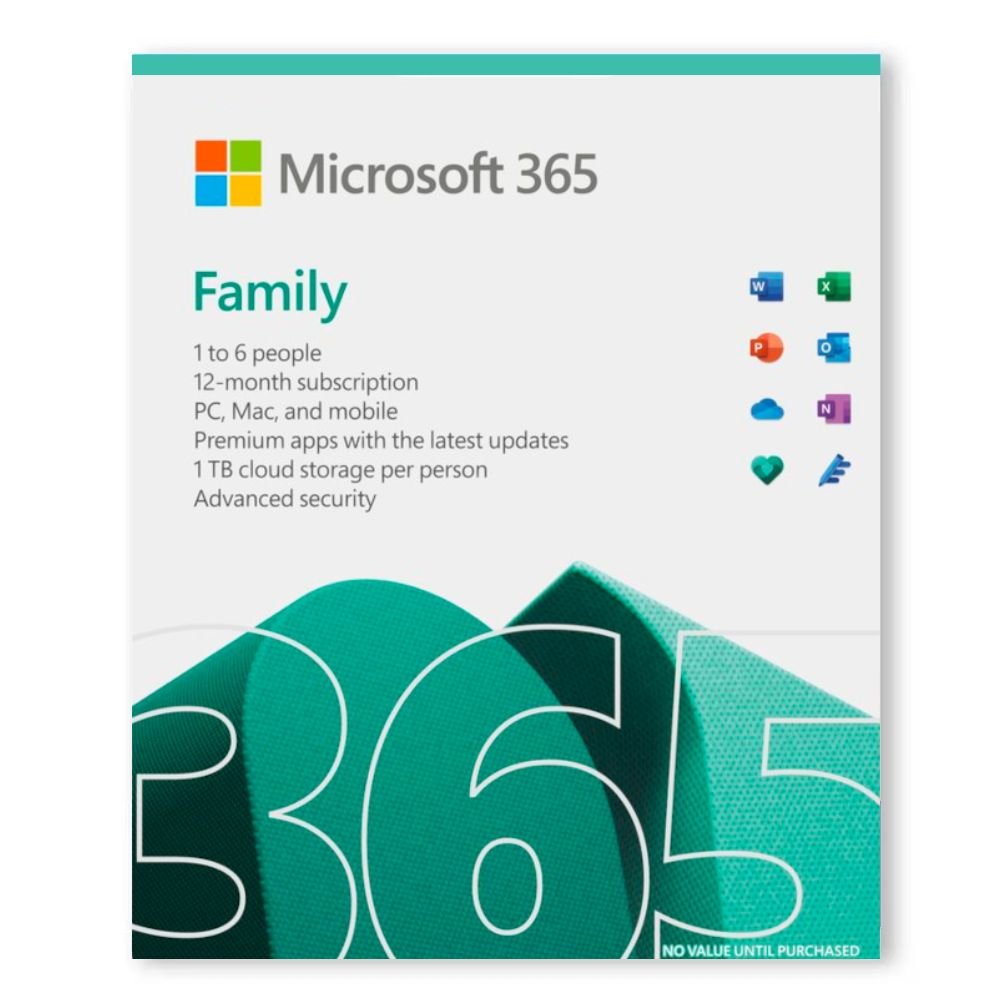
Microsoft 365 Family – 12-Month Subscription | Up to 6 Users
Enjoy premium Microsoft 365 productivity applications, cloud storage, and advanced features for your family with a convenient subscription designed for up to six people.
✅ 12-Month Subscription – Enjoy Microsoft 365 Family benefits for one year from eligible activation.
✅ Up to 6 Users – Share the subscription with up to five additional family members using their own Microsoft accounts.
✅ Up to 5 Devices Per User – Each licensed person can sign in on up to five compatible devices simultaneously.
✅ Premium Office Applications – Word, Excel, PowerPoint, Outlook, OneNote, and other included Microsoft 365 apps.
✅ OneDrive Cloud Storage – Includes 2TB of shared cloud storage for new subscriptions, subject to Microsoft's applicable storage terms.
✅ Multi-Platform Support – Compatible with supported Windows, Mac, iOS, and Android devices.
✅ Family Sharing – Manage invitations and share eligible subscription benefits with family members.
✅ Digital Delivery – Subscription activation details and installation instructions sent directly after payment verification.
✅ Professional Support – Friendly installation and activation assistance from ANYSOFTHUB Sri Lanka.

❗️To activate from some countries - need to use VPN
❗️After activating the key, the subscription is fully functional in the CIS and other any countries.
❗️To activate, use free VPN https://www.urban-vpn.com and connect with provided vpn location then apply download and apply key
❗️If you have any questions about activating or using VPN – write to us in PM, whatapp, livechat and we will definitely help.
Bring your family together with premium Microsoft 365 applications, cloud storage, and powerful productivity tools.
Buy Microsoft 365 Family in Sri Lanka from ANYSOFTHUB TECHNOLOGIES and enjoy a subscription designed for up to six people.
Microsoft 365 Family provides familiar Office applications for documents, spreadsheets, presentations, email, and personal productivity across compatible Windows PCs, Macs, tablets, and smartphones.
With a full Family subscription, the subscription owner can invite up to five additional people to access eligible Microsoft 365 benefits using their own personal Microsoft accounts.
Subscription Duration: 12 months, if confirmed for the supplied product.
Licensed Users: Up to six people, including the subscription owner.
Family Sharing: Invite up to five additional eligible family members.
Individual Microsoft Accounts: Each person uses their own account.
Device Access: Up to five simultaneous Microsoft 365 sign-ins per licensed user.
Supported Platforms: Compatible Windows, macOS, iOS, and Android devices.
License Model: Subscription-based.
Subscription Management: The subscription owner manages Family sharing and renewal.
Renewal: Continued premium access requires an active subscription.
This is a full Family subscription, not a single invitation slot or a perpetual Microsoft Office license.
Microsoft Word: Create and edit documents, letters, assignments, and professional reports.
Microsoft Excel: Manage spreadsheets, calculations, budgets, charts, and personal finances.
Microsoft PowerPoint: Create presentations for work, education, and family projects.
Microsoft Outlook: Manage email, calendars, appointments, and contacts.
Microsoft OneNote: Capture and organize notes, projects, and everyday information.
OneDrive Cloud Storage: Store, synchronize, back up, and access files on compatible devices.
Family Sharing: Invite additional eligible users to share included subscription benefits.
Multi-Device Productivity: Use Microsoft 365 applications on supported computers, tablets, and phones.
Microsoft Defender: Access eligible security features included in the subscription.
Microsoft 365 Updates: Receive supported features and application updates while the subscription remains active.
Offline Productivity: Use installed Office desktop applications offline, subject to periodic license verification.
Some premium AI features may be available only to the subscription owner, and feature availability varies by platform and region.
| Specification | Details |
|---|---|
| Product | Microsoft 365 Family |
| Subscription Type | Family Subscription |
| Subscription Duration | 12 Months, if supplied |
| Users | Up to 6 People |
| Family Sharing | Owner + Up to 5 Additional People |
| Devices | Up to 5 Simultaneous Sign-ins per User |
| Operating Systems | Windows / macOS / iOS / Android |
| Office Applications | Word, Excel, PowerPoint, Outlook, OneNote and included apps |
| OneDrive Cloud Storage | 2TB Shared Pool for New Subscriptions |
| Microsoft Account | Personal Account Required |
| Activation | Official Microsoft Account Redemption |
| License Model | Annual Subscription |
| Perpetual License | No |
| Subscription Ownership | Registered Microsoft Account Holder |
| Renewal | Subject to Subscription Terms |
| Delivery | Digital Subscription Key / Entitlement via Email |
| Installation Media | Not Included |
| Support | Installation and Activation Assistance |
Microsoft 365 Family provides cloud storage for documents, photos, and other important files.
For new subscriptions starting on or after October 8, 2026, Microsoft provides 2TB of pooled OneDrive storage shared across eligible members, rather than a guaranteed separate 1TB allocation per person.
Store and back up important files.
Access files from compatible devices.
Synchronize documents across supported computers.
Share selected files with others.
Manage storage within the available subscription allocation.
Older subscription arrangements may have different storage allocations. Confirm the actual benefits associated with the supplied subscription before purchasing.
Windows: Compatible Microsoft-supported Windows version.
Mac: Compatible Microsoft-supported macOS version.
Mobile: Supported iOS or Android version.
Processor: Compatible processor for the selected platform.
RAM: Sufficient memory for Microsoft 365 applications.
Storage: Adequate free space for installation and updates.
Internet Connection: Required for subscription activation, application downloads, cloud services, and periodic verification.
Microsoft Account: Required for subscription redemption and Family sharing.
Application availability and certain features may vary by device, operating system, language, and region.
Visit the official Microsoft 365 setup website.
Sign in with the personal Microsoft account that will own the subscription.
Redeem the eligible Microsoft 365 Family subscription key.
Confirm that the Family subscription appears in Microsoft account services.
Download and install Microsoft 365 applications on your compatible devices.
Open Word, Excel, or another Office application.
Sign in with your Microsoft account to complete activation.
Open the Microsoft subscription-sharing settings.
Invite up to five additional eligible family members.
Each invited person accepts the invitation using their own Microsoft account.
Family members can then install and use their included Microsoft 365 applications.
Official Microsoft Office Setup: https://microsoft365.com/setup
Microsoft Account Services: https://account.microsoft.com/services
Official Family Sharing Guide: https://support.microsoft.com/en-us/accounts-billing/subscriptions/manage-microsoft-365-subscription-sharing
Microsoft 365 Family allows the subscription owner to share eligible benefits with up to five additional people.
Every member signs in using their own eligible Microsoft account.
Each person can install supported Microsoft 365 applications on compatible devices.
Each licensed person can be signed in to Microsoft 365 on up to five devices simultaneously.
Family members maintain separate personal accounts and files.
Subscription sharing can be managed by the subscription owner.
Some subscription benefits, including certain AI features, cannot be shared.
Microsoft 365 Family is a subscription service rather than a perpetual license.
Premium benefits are available while the subscription remains active.
Continued access after expiry requires a valid renewal.
Renewal options depend on the subscription and account settings.
Automatic renewal can be managed through the relevant Microsoft account settings where supported.
When sharing or the subscription ends, additional members can lose access to premium Office and storage benefits.
Purchase your Microsoft 365 Family subscription through ANYSOFTHUB's secure ordering system.
After your bank transfer has been manually verified by our team, the applicable subscription activation details and installation instructions will be sent directly to your registered email address.
Please note: Delivery is not automatic or instant. Orders are processed after payment verification during support hours.
Software Solutions: Microsoft productivity software options for customers in Sri Lanka.
Secure Ordering: Bank transfer checkout with payment verification.
Installation Guidance: Assistance with official Microsoft setup procedures.
Family Sharing Support: Help with subscription activation and member invitations.
Customer Support: Friendly assistance from ANYSOFTHUB Sri Lanka.
This product is intended to provide a full Microsoft 365 Family subscription, not one invitation slot.
Up to six people can participate in an eligible Family subscription.
Each person uses their own Microsoft account.
Microsoft 365 Family is a subscription and not a lifetime license.
New subscriptions may provide 2TB of shared OneDrive storage rather than 1TB per individual.
Some AI and premium benefits are reserved for the subscription owner.
The actual subscription duration, activation region, and redemption eligibility must be confirmed.
Subscription benefits depend on an active eligible Microsoft 365 subscription.
No physical product package, DVD, or USB drive is supplied.
Refund or replacement requests are subject to the applicable ANYSOFTHUB refund policy and statutory consumer rights.
Contact ANYSOFTHUB support for assistance with installation and activation.
ANYSOFTHUB TECHNOLOGIES — Your Trusted Software Reseller in Sri Lanka.
microsoft.com).Use the official direct download link provided in your delivery email or visit the vendor portal (e.g. setup.office.com or microsoft.com/software-download).
Run the setup program and follow the standard on-screen instructions to complete software installation on your PC.
Open the installed software, navigate to File → Account or Activation Settings, and input the genuine 25-character product key.
Click Activate. Your license will connect to Microsoft servers and confirm permanent validation. If you need any assistance, contact our WhatsApp hotline (+94 71 117 8269).
Your license key, setup links, and instructions are dispatched electronically to your registered email address within 2 to 5 hours of confirmed payment verification (typically <60 minutes during business hours: Mon–Sat 8:30 AM – 7:30 PM SLST).
If your issued license key fails to activate or reports an activation error code, simply email a full-screen screenshot to support@anysofthub.com or WhatsApp (+94 71 117 8269). We will resolve or replace the key immediately.
Yes, 100% genuine. All keys are sourced through authorized software distributors and activate directly with official vendor servers (e.g., Microsoft, Kaspersky, Autodesk). You receive all official vendor updates and security patches.
Your license key, official download links, and step-by-step setup guide are delivered digitally to your registered email address and customer vault within 2 to 5 hours of confirmed bank transfer payment verification (often <60 minutes during business hours).
Retail & Bind licenses can be reinstalled or transferred to a new machine after uninstalling from the original PC. OEM licenses bind permanently to the original computer motherboard and cannot be moved to another machine.
We provide a 15-Day Defect Replacement Guarantee. If you experience an activation error code, simply WhatsApp our support team (+94 71 117 8269) with a screenshot. We provide free remote activation assistance via AnyDesk or replace the key immediately.
Yes. Upon payment confirmation, an official downloadable PDF tax invoice with invoice number and business registration details is generated and sent to your email.
No published customer reviews yet for this software. Be the first verified buyer to leave feedback!
Sign in to review your verified software purchase.
RECOMMENDED FOR YOU
−26% DIGITAL LICENCE  −25% DIGITAL LICENCE
 −11% DIGITAL LICENCE
 −30% DIGITAL LICENCE